


Citi Bike
4.61.42K Reviews
App Specs
- Version
- 2026.32.3.1787124423
- Updated On
- License
- Free
- Downloads
- 1,000,000+
- Developer
- Lyft, Inc.
- Categories
- Maps & Navigation
- Platform
- Android, iOS
Screenshots

 Analysis by AppCompare
So, you've probably heard about Citi Bike if you're living in or visiting New York City. It's that cool bike-sharing service that lets you zip around the city without having to own a bike yourself. I decided to give it a whirl and see what all the fuss is about. Spoiler alert: it’s a game-changer!
What you get without paying for the app
The app itself is free, which makes trying it a low-commitment first step if you are curious about getting around New York by shared bike. That does not mean every ride or membership option is free: the cost of using the service depends on the plan you choose. I would treat the download as a way to explore the system, then check the current plan details in the app before deciding whether regular use makes sense for your budget.
That distinction matters because the value is not simply “a free bike.” You are getting access to a way of finding bikes and docks around the city, while the actual riding arrangement comes with its own terms. If you are only visiting for a short time, compare the available casual option with your likely number of trips. If you expect to ride often, look at the membership choice rather than assuming one plan is automatically better. A little arithmetic based on your own routine is more useful than choosing on the spot.
Where the app earns its place
As a Maps & Navigation app from Lyft, Inc., Citi Bike is most useful when it turns a vague plan—“I’ll bike across town”—into practical decisions: where to start, whether there is a bike nearby, and where you might return it. The map is not just decoration. For a shared-bike trip, a dock with a bike at the start and a place to leave it at the end are both part of the route, so checking both ends before setting off can save a frustrating detour.
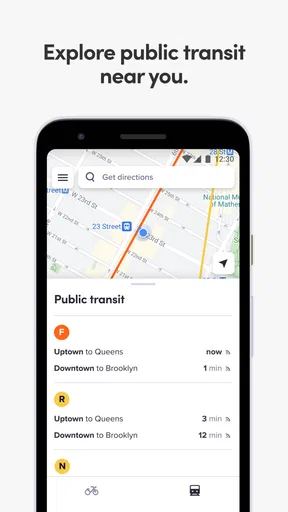
That is also why I would not use it as a substitute for every navigation tool. A general map app may be more suitable when you need a broad view of transit, walking, or several kinds of directions at once. Citi Bike’s value is narrower and more local: it helps you think through the shared-bike part of a New York trip. For a ride that starts or ends far from a convenient station, walking, public transport, or another way of getting around may be the more sensible choice.
A more realistic way to plan a ride
Imagine leaving work when the trains are crowded and wanting to get to an appointment across the neighborhood. Before walking to a station, I would check whether there is a bike near my starting point and whether there is a dock near the destination. If either end looks inconvenient, I would change the plan before leaving, not after arriving at an empty station or riding past the place I meant to stop. This small habit is more valuable than treating the map as a one-time lookup.
On an unfamiliar journey, I would also use the suggested route as a starting point rather than a promise that every block will feel comfortable. New York streets can change quickly from calm to busy, and a route that looks efficient on a screen still calls for attention at intersections and around turning traffic. If I am unsure about a stretch, I would rather slow down, check the route safely while stopped, or choose a different transport option than stare at the phone while moving.
Worth Reading Before You Choose

EA SPORTS FC Mobile 26 Is a Bigger Football Game, but It Takes Time

Flipboard Shows What News Apps Must Do Beyond the Feed

Switching to Android Auto Means Rethinking Your Driving Routine

Google Calendar Makes a Crowded Week Easier to Manage

Ludo King Makes the Most of the Minutes Between Plans

Baby Panda World Brings Quick Play to Modern Phones, but Its Game Library Feels Busy
Who will get the most from it
This is a particularly good fit for people who already move around New York and can use a station at both ends of a trip. It can also suit visitors who want to cover more ground than a walk allows, provided they are comfortable riding in city traffic and have checked the plan and station situation first. The app is available on Android and iOS, is rated for Everyone, and has a 4.6 average from around 6,700 ratings, with over a million installs. Those figures suggest a well-used service, but they do not guarantee that a bike will be waiting at the station you choose at the moment you need one.
I would be less likely to recommend it to someone who needs a guaranteed departure time, dislikes cycling beside traffic, or will be staying somewhere without convenient stations. In those cases, public transport or a general ride-hailing option can be a better fit, even if a bike looks appealing on a map. The right comparison is not “bike versus no bike”; it is whether the whole trip, including getting to a bike and returning it, is simpler than the alternatives.
Getting Started with Citi Bike
First things first, downloading the Citi Bike app was a breeze. Available for both Android and iOS, the app is your gateway to unlocking a bike and starting your adventure. Once I had the app up and running, setting up an account was straightforward. You’ll need to enter some basic info and choose a membership plan. They offer options for both casual riders and those who plan to make biking a regular thing.
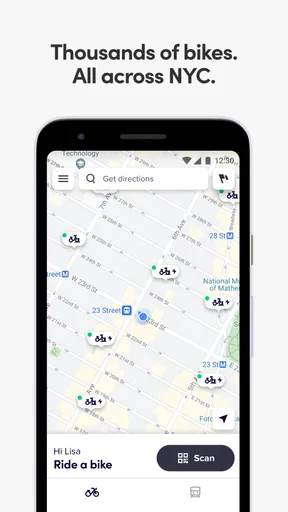
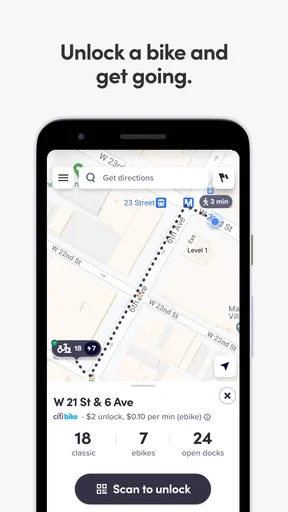
After setting up, I was ready to hit the road. The app’s interface is super user-friendly. You can easily find available bikes and docks near you, which is crucial in a busy city. Plus, the map feature is pretty handy, showing you where stations are located and how many bikes are available at each one.
The Riding Experience
Let’s talk about the bikes themselves. They’re sturdy and surprisingly comfortable, with adjustable seats to fit riders of various heights. I was impressed by how smooth the ride was. You don’t have to worry about the bumpy roads too much, as these bikes are built to handle the city's hustle and bustle.
One of the coolest features is the pedal-assist bikes. If you’re not feeling up to a workout, or you just want a little help getting up those pesky hills, these are a lifesaver. The pedal-assist gives you that extra boost without making you feel like you’re cheating.
Navigating the City
As someone who’s not originally from NYC, I was worried about navigating the city streets on a bike, but the app comes to the rescue again. It offers suggested routes that are bike-friendly, helping you avoid the craziest traffic spots. I found this particularly useful when exploring new neighborhoods or trying to get from one end of the city to the other.
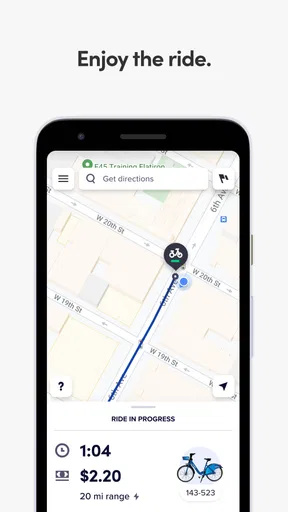
Plus, the app tracks your ride stats, which is fun if you’re into seeing how far you’ve ridden or how many calories you’ve burned. It’s like having a little fitness tracker integrated into your urban commute.
Things to Keep in Mind
While Citi Bike is a fantastic way to get around, there are a few things to be aware of. Availability can sometimes be an issue, especially during peak hours or in popular areas. It’s a good idea to check the app for bike and dock availability before heading to a station.
Also, remember that NYC traffic can be intense. Always stay alert and follow the rules of the road. Wearing a helmet is also highly recommended for safety, even though it’s not provided with the bikes.
Choosing it for the right kind of trip
For me, the strongest use case is a short, point-to-point journey where a bike saves a meaningful amount of time compared with walking, but the stations are still close to both ends. That might mean reaching a meeting, crossing a neighborhood for an errand, or fitting in a ride while visiting. It is less compelling for a trip with several stops: every extra stop raises the question of where to leave the bike and whether another one will be available when you want to continue.
A useful routine is to check the destination before you unlock anything, then keep a nearby alternative station in mind. That does not eliminate the possibility of a change of plan, but it gives you a fallback if the first dock is full or the closest station has no bike. I would also avoid planning a tight connection around a shared bike unless I had enough flexibility to walk or switch modes. The app can help with the bike part of a trip, but it cannot make station availability predictable.
What to expect from the navigation
Suggested bike-friendly routing is helpful when you do not know the area, but I would still treat it as guidance rather than an instruction to follow without thinking. A route can be useful on paper and still feel uncomfortable because of traffic, roadworks, weather, or your own confidence. If the route is unfamiliar, reviewing it before you start and checking your surroundings at safe stopping points is a better workflow than trying to make decisions while riding.
The ride statistics can add a pleasant sense of progress, especially if you use cycling as part of a regular routine. I would not make them the main reason to choose this app, though. The more practical benefit is connecting a ride to the city’s stations; distance or calorie estimates are secondary, and they do not replace a dedicated fitness tool if detailed training is your priority.
Checking the basics before committing
The current version is 2026.20.3.1779867325, and the app requires Android 9 or later on Android devices. Those details are worth checking before relying on it for a trip, particularly if you use an older phone. The app is free to download, but I would still review the plan information and the ride terms shown in the app before choosing a membership or setting off. That is the practical answer to “Will this cost me anything?”: installing it costs nothing, while use of the bike service depends on the option you select.
Another reasonable question is whether it suits someone who has never ridden in the city. The app can make station and route planning easier, but it cannot build riding confidence for you. If traffic feels intimidating, try a calmer route or choose transit instead; there is no benefit in forcing a bike trip just because the map presents one. A helmet and attention to local road rules are sensible parts of the plan, not optional details to leave until the last minute.
Final Thoughts
Overall, using Citi Bike was a fantastic experience. It’s an affordable, eco-friendly, and fun way to explore the city. Whether you’re a local looking for a new commute option or a tourist wanting to see the sights in a unique way, this app ticks all the boxes. Just make sure to plan a little ahead, stay safe, and enjoy the ride!
My recommendation is conditional rather than universal: I would install it if I expected to make bike trips in New York and wanted to check the station picture before committing. The app is free, and its focused map can make an urban ride easier to organize. I would skip relying on it as my only transport plan when timing is strict, stations are inconvenient, or riding in traffic is not comfortable for me. In those situations, another mode is not a compromise; it is simply the better match.
With a 4.6 average and around 1,400 written reviews, it has plenty of visible user feedback, but the useful question for me is still whether the stations fit my own routes. Lyft, Inc. has kept the app focused on the shared-bike experience rather than turning it into a general city guide. If that is what you need, it is an easy tool to try; if you need certainty from door to door, I would compare the full journey with walking or public transit before heading out.
Pros
- User-friendly interface for easy navigation.
- Extensive network of bike stations.
- Affordable pricing for short trips.
- Real-time bike availability updates.
- In-app route planning for convenience.
Cons
- Limited service area coverage.
- Occasional bike maintenance issues.
- App may lag during peak hours.
- No offline mode for route planning.
- Requires a stable internet connection.
FAQs for Citi Bike
What is Citi Bike and how does it work?
Citi Bike is a bike-sharing program that allows users to rent bicycles for short trips around the city. Users can locate and unlock bikes using the Citi Bike app, which shows available bikes and docking stations. After a ride, bikes must be returned to any docking station, making it a flexible transportation option.
How much does it cost to use Citi Bike?
Citi Bike offers several pricing options, including single rides, day passes, and annual memberships. Pricing can vary based on ride duration and membership type. It's important to check the app for current rates and any promotions. Additional fees may apply if a bike is kept beyond the allotted time.
Is the Citi Bike app available for both Android and iOS devices?
Yes, the Citi Bike app is available on both Android and iOS platforms. Users can download it from the Google Play Store or the Apple App Store. The app is essential for locating bikes, checking availability, and managing your account efficiently on the go.
What should I do if I encounter an issue with a Citi Bike?
If you experience any issues with a Citi Bike, such as mechanical problems or difficulty docking, contact customer support through the app or by phone. The team is available to assist and ensure that your biking experience is smooth and hassle-free. Reporting issues helps maintain the quality of service.
Are there any safety measures I should be aware of when using Citi Bike?
Safety is a priority when using Citi Bike. Always wear a helmet, obey traffic signals, and use designated bike lanes when available. The app provides safety tips and guidelines, and it's advisable to familiarize yourself with them before riding. Regular maintenance checks are performed on bikes to ensure safety.


